Why realistic AI 3D worlds suddenly feel within reach
A year ago, “AI 3D world” usually meant a nice concept image and a pile of manual cleanup. Now it can mean a blockout you can orbit, relight, and start dressing—fast enough that teams are actually testing it in production, not just demos.
Three shifts made it feel suddenly practical: better text-to-3D and image-to-3D models for usable props, neural capture methods like NeRFs and Gaussian splats for real places, and tighter bridges into DCC tools and engines so outputs land where artists work. You’re also seeing hybrid workflows where procedural generation handles structure while AI fills detail.
The catch is that “reachable” still comes with costs: GPU time, storage for heavy captures, and consistency issues that show up the moment you need repeatable scale, clean topology, or animation-ready assets.
Define “realistic” first: visuals, physics, style, and scale
You can’t judge “realistic” until you decide which kind you mean. Visual realism is the obvious one—materials that read correctly, believable roughness, and lighting that holds up when you change time of day. But worlds also need physical realism: does a chair have thickness, does a slope behave like a slope, do collisions match what players see, and can objects be grabbed without glitching?
Style realism matters too. A world can be “realistic” inside a stylized art direction if it’s internally consistent in color, wear, and detail density. Scale is the hidden dealbreaker: doors, stairs, and props must match a clear unit system across the whole space, or everything feels like a toy set. This is where many AI outputs fail—one great-looking corner, then drifting proportions, inconsistent texel density, and a cleanup bill in retopo, UVs, and re-authoring collision.
Pick your generation level: textures, assets, scenes, or worlds
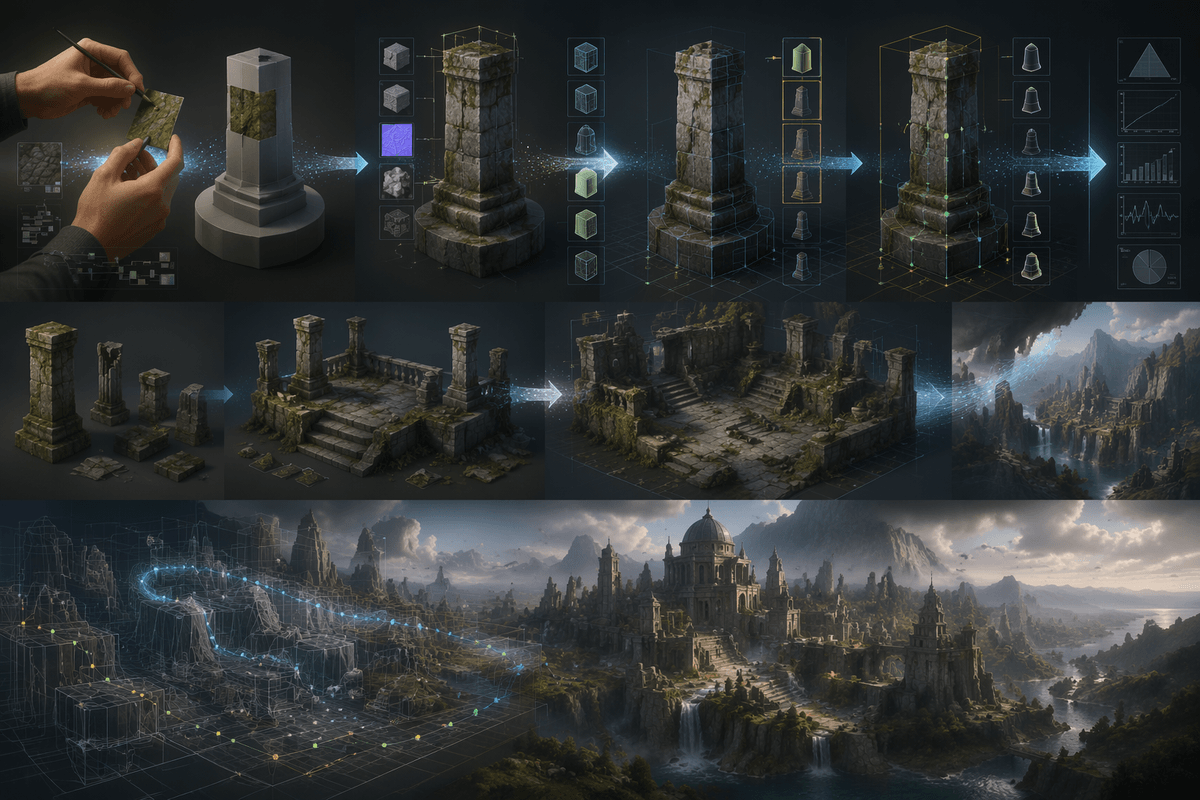
Most teams get better results by choosing the “level” they want AI to generate, because each level trades control for speed. Texture generation is the least risky: you keep your mesh, UVs, and scale, and use AI for albedo/roughness variations, decals, or material ideas. The cost shows up in review time—seams, mismatched wear, and inconsistent texel density still need an artist pass.
Asset generation (props, foliage, rocks) is the next step up. It can be fast for set dressing, but you often pay in topology, UVs, LODs, pivots, and collision—basically everything that makes a prop “engine-ready.” Scene generation aims at layout plus dressing: good for blockouts and mood, weaker when you need interactable doors, modular kits, or strict performance budgets.
World generation is where expectations usually outrun tools. At that scale, continuity, streaming, navmesh, and gameplay constraints dominate, so AI works best as a proposal engine, not a final author.
How AI actually builds 3D: common pipelines that work
A typical “AI 3D” result is less a single magic button and more a chain of conversions. One common pipeline starts from text or a few reference images to generate a rough mesh plus baked textures, then immediately routes that output through cleanup steps: remeshing for sane topology, UV generation, material reconstruction into PBR maps, and automated LODs. You get something you can place in a scene quickly, but it rarely survives close inspection without an artist pass on silhouettes, seams, and scale.
Another working pipeline avoids meshes at first: capture or generate a view-consistent radiance field (NeRF) or Gaussian splats, then use it as a reference for rebuilding real geometry. This can be excellent for “scan-like” spaces and fast previs, but it’s heavy to store, tricky to edit at object level, and can break when you need clean collisions, modular reuse, or gameplay interactions.
The most production-friendly approach is often procedural structure plus AI detail: use rules or tools for layout, metrics, and streaming boundaries, then use AI for materials, decals, clutter props, and variant generation. It’s less impressive in a demo, but it’s the pipeline that keeps control where teams actually need it.
Realism breaks on consistency: lighting, scale, and continuity
You notice the problem when you try to do normal production moves: rotate the sun, swap the HDRI, or move a prop two meters and expect shadows and reflections to still make sense. Many AI outputs bake lighting into textures or hallucinate highlights that look fine from one angle, then fall apart under relighting. Even when the materials are “PBR-looking,” roughness and normal detail often aren’t coherent across nearby surfaces, so a wall reads like three different walls.
Scale drift is the other realism killer. A scene can have a believable doorway, then chairs that are 20% too small and stairs that don’t match human stride, all because generations weren’t anchored to a unit system and camera height. Continuity compounds it: repeated props mutate, edges don’t align for modular kits, and geometry changes between iterations, breaking collision, navmesh, and level dressing. Fixing this usually costs time, not just compute—someone has to enforce metrics, relight, and re-author the “boring” consistency that sells the world.
From pretty to usable: optimization for games, VR, and film
A polished AI scene can look production-ready in a screenshot while being nowhere near ready for shipping. What matters is the target you're building for. A real-time game needs predictable frame times, stable memory use, and reliable collision. VR raises the bar even further, where latency, shimmering surfaces, and LOD transitions become immediately noticeable. Film pipelines are more forgiving about heavy assets, but they demand clean UVs, editable geometry, and materials that still behave correctly once lighting changes from shot to shot.
Raw AI assets rarely arrive in that state. Dense, irregular meshes, uneven texel density, and baked lighting are common, and those shortcuts quickly become liabilities when cameras move or lights animate. The fastest route to something usable is still a familiar one: remesh or decimate the geometry, rebuild proper PBR materials, generate LODs and impostors, then author collision and occlusion by hand where needed.
The expensive part isn't the optimization software—it's the review afterward. Every reduction pass risks changing silhouettes, scale relationships, or visual continuity across gameplay and cinematic sequences. Compute time is easy to budget; artist time spent confirming that nothing important changed is usually what determines whether an asset is truly ready to ship.
Legal and ethical friction: training data, licenses, and ownership

You’ll also hit questions that have nothing to do with polygons. If a model was trained on scraped scans, photogrammetry sets, or copyrighted game assets, you may not have the rights you think you have—especially if the output is “too close” to a recognizable source. Many tools don’t grant you clean ownership of weights, datasets, or even outputs without conditions, and those terms can differ between enterprise and self-serve tiers.
In practice, teams end up building guardrails: prefer models trained on licensed or first-party libraries, keep prompts and source references for auditability, and treat third-party “AI asset packs” like any other vendor deliverable with provenance checks. The limitation is cost and friction: curated data and legal review slow iteration, and creating your own training set can be more expensive than the GPUs.
A realistic starter plan: build a small world you can ship
Pick one shippable slice: a single room, alley, or 30–60 second “walk and interact” path with a clear performance target (triangle/texture budgets, VR frame time if needed) and a fixed unit scale. Use procedural tools for layout and metrics, then AI for what’s cheap to iterate: materials, decals, clutter variants, and a small prop set. Treat any text-to-3D meshes as draft inputs and budget real time for retopo, UVs, collisions, and LODs. Gate the pilot on relighting, repeated props staying consistent, and a rights/provenance checklist you can defend.